
Master Planning and Action Messages – Detailed Functional Overview
Introduction
Master Planning in Dynamics 365 Finance and Operations is a core Supply Chain Management capability that helps organizations plan procurement, production, and inventory based on actual demand, forecasts, and supply parameters. It ensures material availability at the right time while optimizing inventory levels and operational costs.
This document provides a professional and structured explanation of Coverage Groups, Master Plans, Net Requirements, and Action Messages, focusing on how these components work together to generate and manage planned orders.
Coverage Groups
Coverage Groups are one of the most critical configurations in Master Planning. They define how and when demand is covered for items by controlling time fences, planning logic, and replenishment strategies. Once defined, coverage groups are assigned to items and directly influence planned order generation.
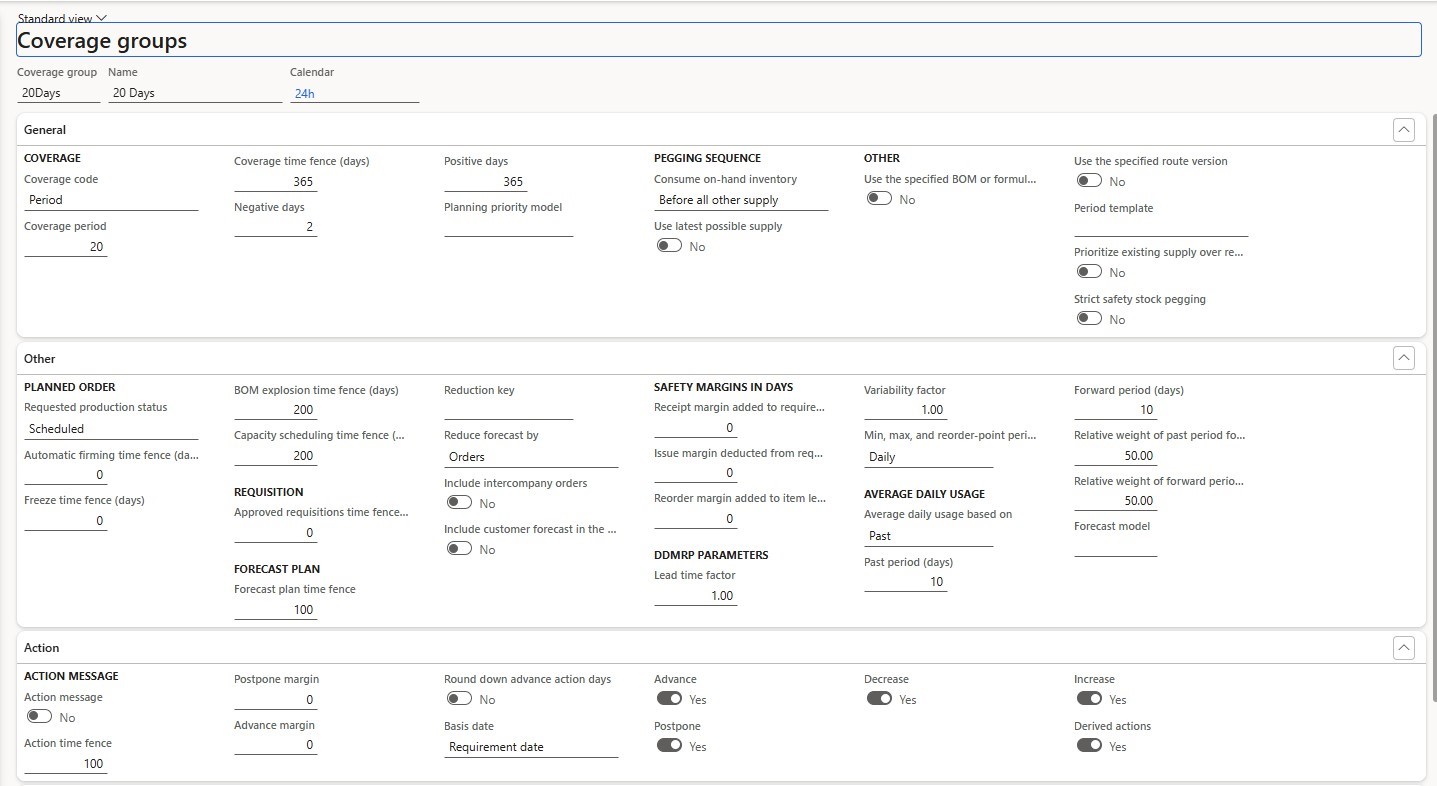

Coverage Code Options
1. Period
The Period coverage code is used when demand is planned within defined time intervals rather than individually per requirement.
Key characteristics:
- Demand within the specified period is grouped
- Planned orders are generated based on the defined coverage
- Suitable for items with stable or predictable demand
Important parameters:
- Coverage period (days, weeks, or months)
- Safety margin consideration
- Forecast aggregation within the period
This method reduces the number of planned orders and supports smoother procurement or production cycles.
2. Requirement
The Requirement coverage code creates a planned order for each individual demand.
Key characteristics:
- One-to-one relationship between demand and
- Each sales order, forecast line, or requirement generates its own planned
- High accuracy but may result in a larger number of planned
This option is best suited for:
- High-value items
- Make-to-order scenarios
- Items with irregular or customer-specific demand
3. Min / Max
The Min/Max coverage code is inventory-driven rather than demand-driven. Key characteristics:
- Inventory levels are maintained between minimum and maximum
- When inventory falls below the minimum, master planning generates a replenishment order up to the maximum level.
- Demand dates are less critical than stock
This option is commonly used for:
- Consumables
- Fast-moving spare parts
- Items requiring continuous availability
4. Manual
The Manual coverage code excludes the item from automatic master planning. Key characteristics:
- No planned orders are automatically
- Planner manages replenishment
- Useful for exceptional or non-standard
This option is often used when planning decisions require direct human control.
5. Priority
The Priority coverage code allows multiple coverage groups to be evaluated in a priority sequence.
Key characteristics:
- Coverage logic is applied based on priority
- Enables advanced planning
- Supports complex business scenarios where different planning rules apply under different
Master Plans
After defining coverage groups, the next step is to configure Master Plans. Master Plans control how master planning is executed and which parameters are applied during calculation.
Each master plan can be designed for a specific purpose, such as static planning, dynamic planning, or simulation.
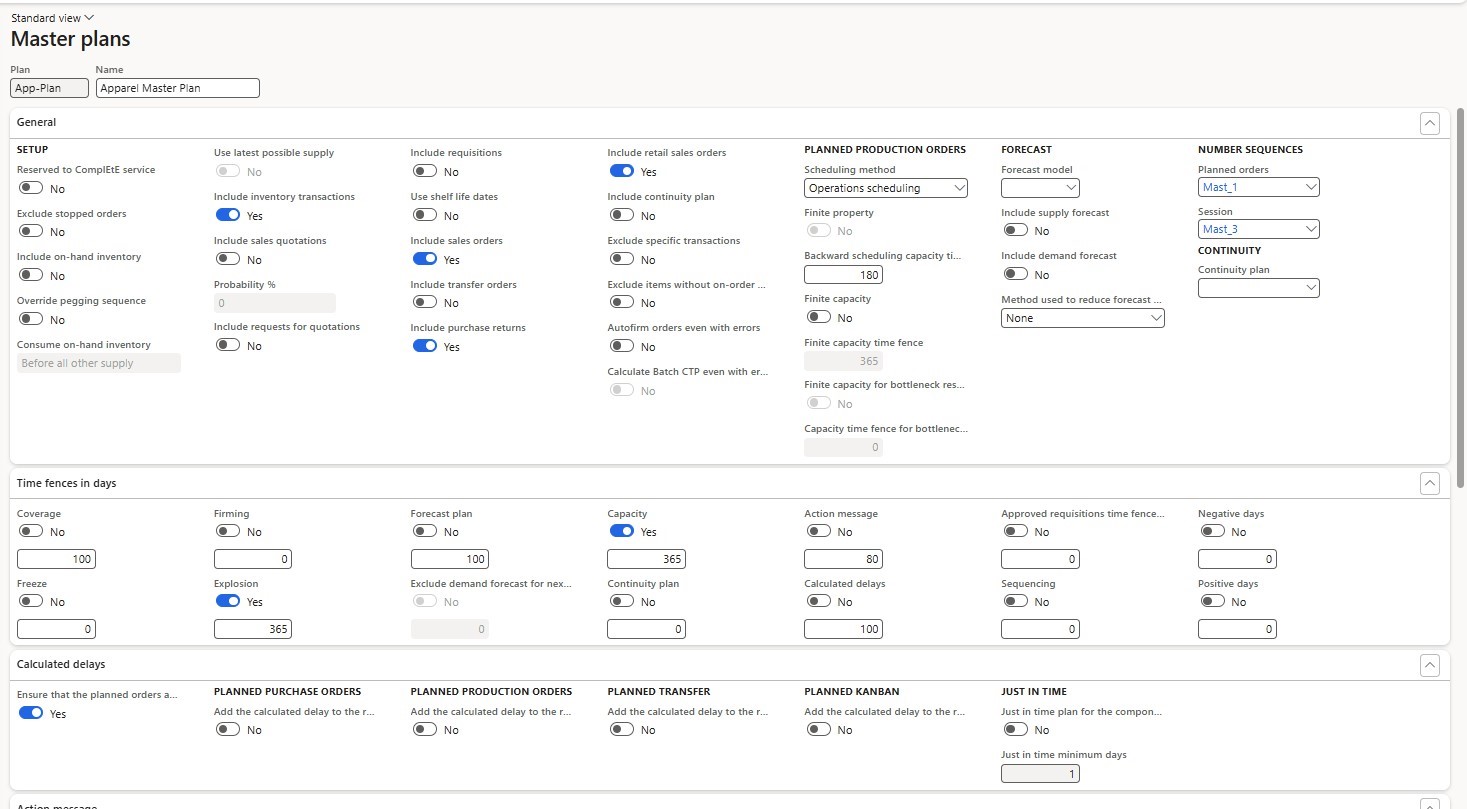

General Tab Parameters
The General tab defines the overall behavior of the master plan.
Key parameters include:
- Plan type (Static or Dynamic)
- Coverage group selection
- Forecast plan association
- Inclusion of on-hand inventory, purchase orders, and production orders These settings determine the data scope and logic used during master planning
Time Fence Parameters
Time fences define how master planning treats demand and supply within specific time horizons. Key time fences include:
- Freeze time fence: Prevents changes to planned orders within a fixed period
- Firm time fence: Planned orders inside this fence are automatically firmed
- Forecast time fence: Determines how forecast consumption behaves
Time fences provide stability and control, ensuring that short-term plans are not constantly changing.
Calculated Parameters
The Calculated tab controls performance and calculation behavior. Key parameters include:
- Explosion level
- Regenerative or net change planning
- Caching and update settings
These parameters influence calculation speed, system performance, and planning accuracy.
Assigning Coverage Groups to Items
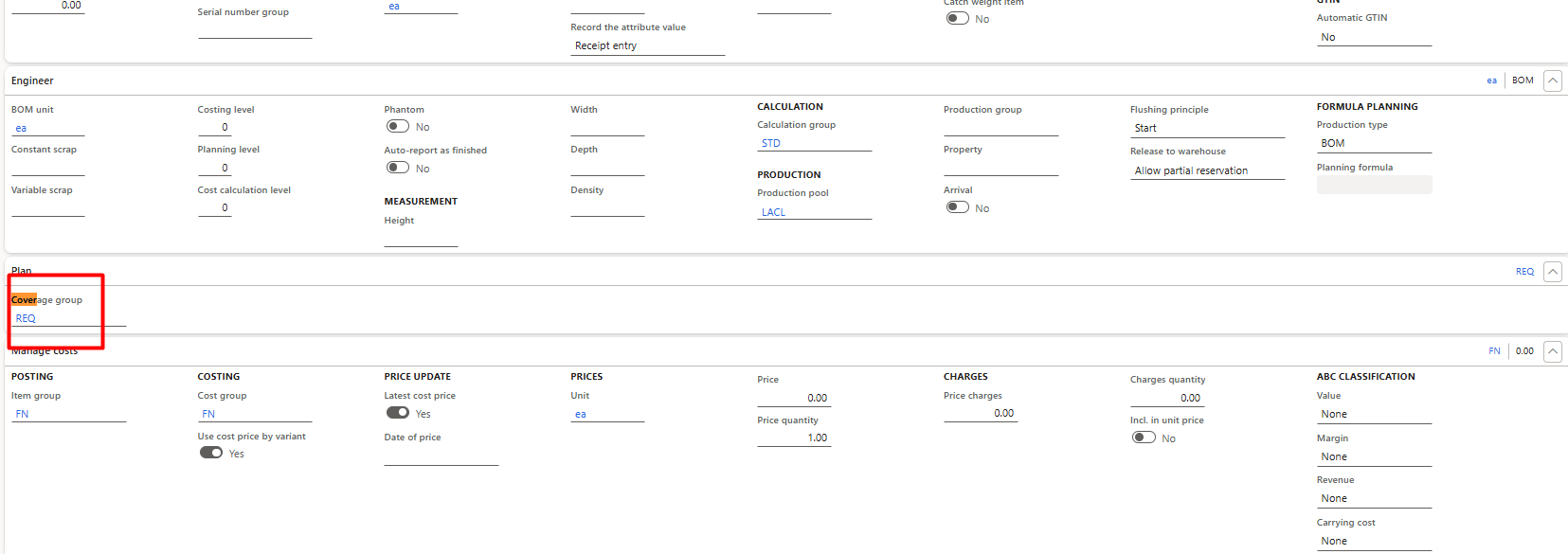

- Open the released product
- Navigate to the Plan tab
- Assign the appropriate coverage group
This assignment ensures that master planning applies the correct planning logic for each item.
Net Requirements and Planned Orders
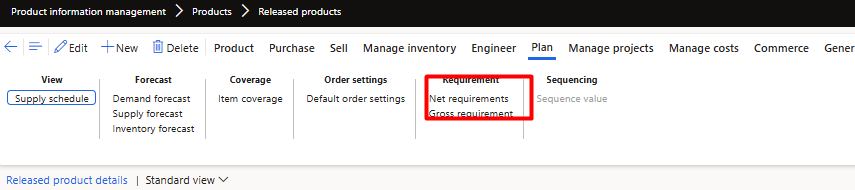

After configuration, planners calculate demand and supply using Net Requirements. Process:
- Open the released product
- Go to the Plan tab
- Select Net requirements
- Run the Update function The system calculates:
- Planned purchase orders
- Planned production orders
- Planned transfer orders
These planned orders are generated based on demand, coverage settings, and master plan parameters.
Firming Planned Orders
Once planned orders are reviewed, they are firmed to convert them into actual execution documents.
Examples:
- Planned purchase orders are firmed into purchase orders
- Planned production orders are firmed into production orders
Firming marks the transition from planning to execution and allows operational teams to proceed with procurement or production.
Action Messages
Action Messages are system-generated recommendations that guide planners in managing changes and exceptions.
Common action messages include:
- Expedite: Suggests moving an order earlier
- Postpone: Suggests delaying an order
- Cancel: Indicates unnecessary orders
- Increase or Decrease quantity
Action messages help planners react proactively to demand changes, supply delays, and planning conflicts while maintaining optimal inventory levels.
Conclusion
Master Planning in Dynamics 365 Finance and Operations is a powerful engine that integrates demand, supply, and inventory planning. By correctly configuring coverage groups, master
plans, and time fences, organizations can achieve accurate planning, reduce costs, and improve service levels.
Action Messages further enhance decision-making by providing clear and actionable insights, enabling planners to respond effectively to changing business needs.
This structured approach ensures a smooth transition from demand planning to execution while maintaining operational control and planning stability.