Understanding MCP Server Part 4
From ERP Data to Business Action: Copilot Cowork with D365 FO
Sample Problem
It’s Monday morning. The CFO wants a cash flow view for the next 30 days. Someone pulls AR aging from D365. Someone else exports AP invoices. A third person checks the bank balances. Then someone trawls through their inbox for vendor payment requests that never made it into the system.
By the time, the spreadsheet is ready, it is Tuesday — and some of the data is already stale.
This is not a people problem. It is an architecture problem. ERP systems were built to store and report data, not to reason across it, connect it to real-world context, and act on it.
What if your ERP system could do more than answer questions — what if it could act?
With Copilot Cowork and Dynamics 365 Finance C Operations, that shift is becoming real: moving from manual navigation and reporting to governed, AI-driven execution across ERP, Outlook, Excel, and Microsoft 365.
Introduction
Microsoft Copilot Cowork shifts Copilot from AI-assisted chat to AI-driven execution. It can complete complex, multi-tool tasks end-to-end, with background processing and review checkpoints that keep users in control.
Powered by Work IQ and connected to Dynamics 365 Finance C Operations through MCP,
Cowork can understand business context, access governed ERP capabilities, and
orchestrate work across ERP, Outlook, Excel, documents, and Microsoft 365 — without bypassing role-based access or audit controls.
Why This Matters
For enterprise teams, the real value is not just faster answers — it is faster execution with governance. Copilot Cowork can help reduce manual effort, connect business context
across systems, and keep users in control through review checkpoints.
• Faster decision-making by combining ERP, Outlook, Excel, and Microsoft 365 context.
• Reduced manual navigation across ERP screens, reports, and spreadsheets.
• More actionable outputs, such as forecasts, journals, emails, and shareable documents.
• Stronger governance through role-based access, auditability, and human review before execution.
Prerequisites
Category Requirement
License
Requirement D365 Finance and Operations license – Finance Premium, Supply Chain, or equivalent
License
Requirement Microsoft Enterprise license – E3, E5, or equivalent
License
Requirement Microsoft Copilot license – to be attached to the Enterprise license
Environment
Requirement Tier 2+ or Unified Developer Environment for running MCP. MCP is not supported in cloud-hosted environments.
Version D365 Finance and Operations version 10.0.47 or above
Roles Power Platform
Admin center System Administrator, System customizer, Finance and Operations basic user, Basic user
Roles D365 Finance and
Operations System User, System Administrator
Applications in Power Platform
Admin center Copilot for finance and operations apps, Copilot in Microsoft Dynamics 365 Finance, Copilot in Microsoft Dynamics 365 Supply chain management, Other relevant apps (recommended)
After the prerequisites are met, complete the following activities to enable Copilot Cowork.
Configuration in Microsoft 365 Admin Center
1. Enroll in the Frontier Preview program
Navigation: Microsoft 365 Admin Center → Copilot → Settings → Frontier
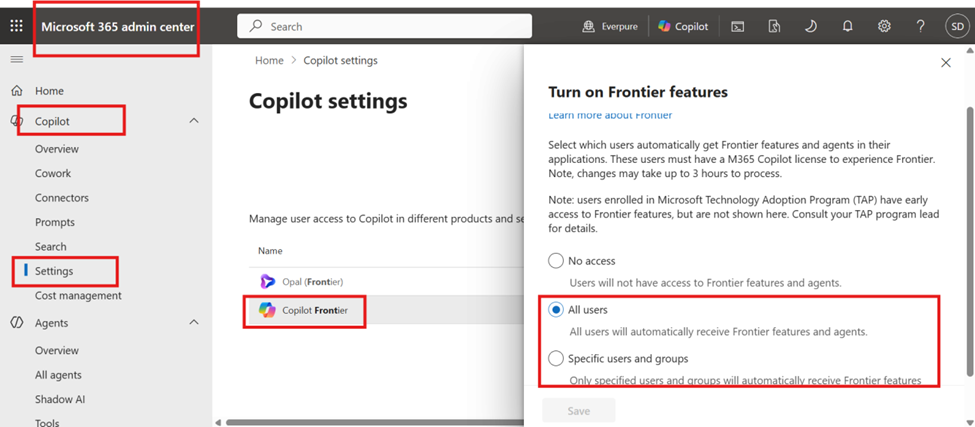
Note: Enablement and sync may take 1–3 hours.
2. Enable Dataverse integration
Navigation: Microsoft 365 Admin Center → Copilot → Settings → Dataverse data available in Microsoft 365 Copilot
This setting allows Microsoft 365 Copilot to query Dataverse data and process responses through Power Apps or Dynamics 365. Dataverse powers most Dynamics 365 and Power Platform experiences
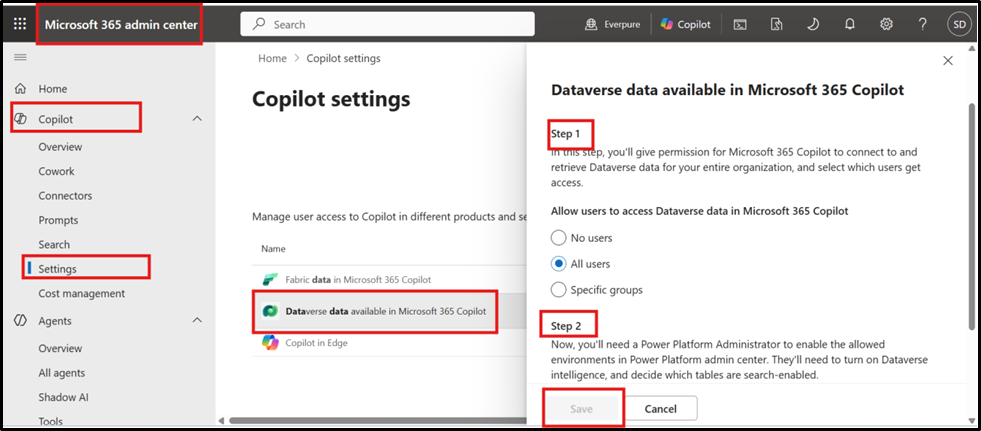
This is a two-step enablement process: first, allow users to access Dataverse data in Copilot; second, enable the required Power Platform setting for Dataverse intelligence.
Navigation: Power Platform Admin Center → Environment → Select Environment → Settings
→ Features
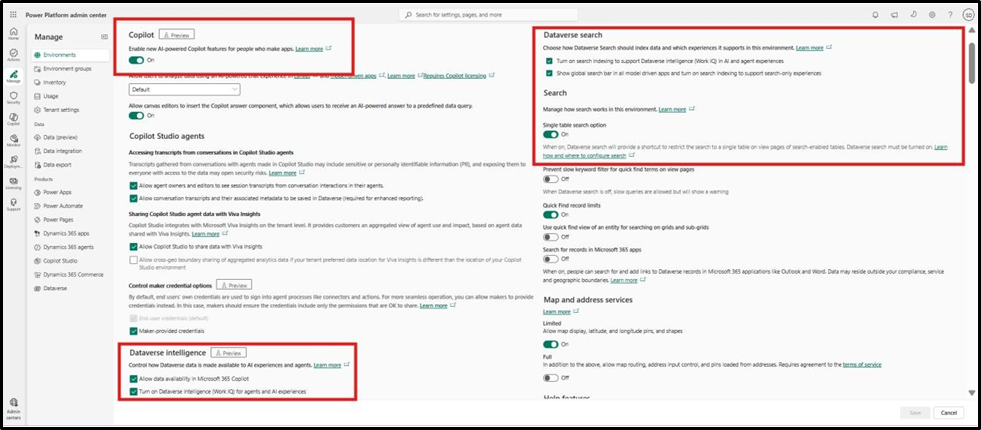
Note: Enablement and sync may take 1–3 hours.
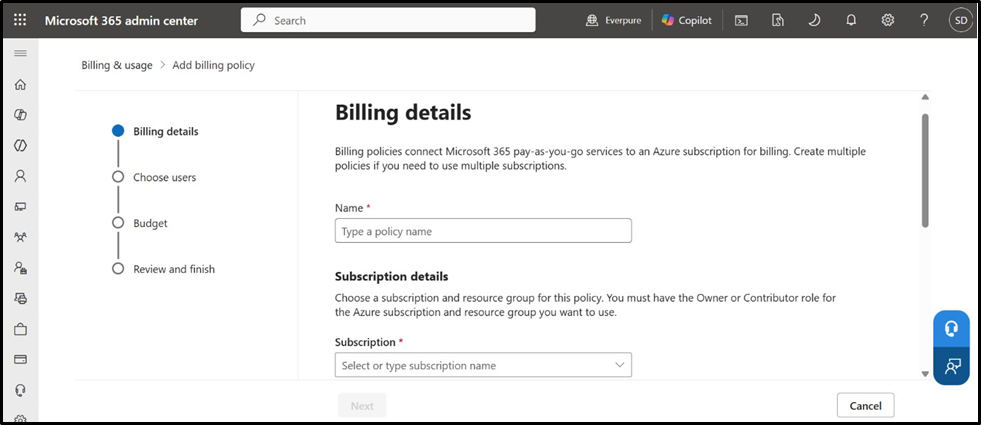
1. Set up Copilot pay-as-you-go billing
Navigation: Microsoft 365 Admin Center → Copilot → Settings → Copilot pay-as-you-go
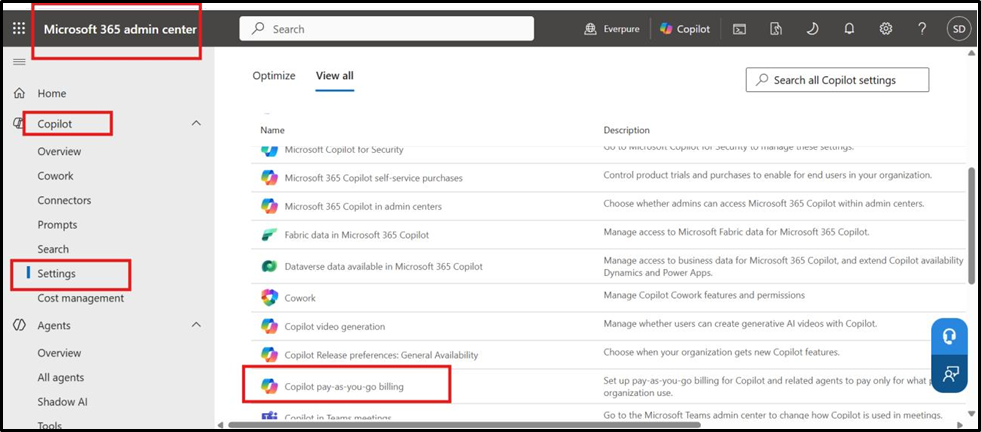
Run the setup wizard and link the required Azure subscription.
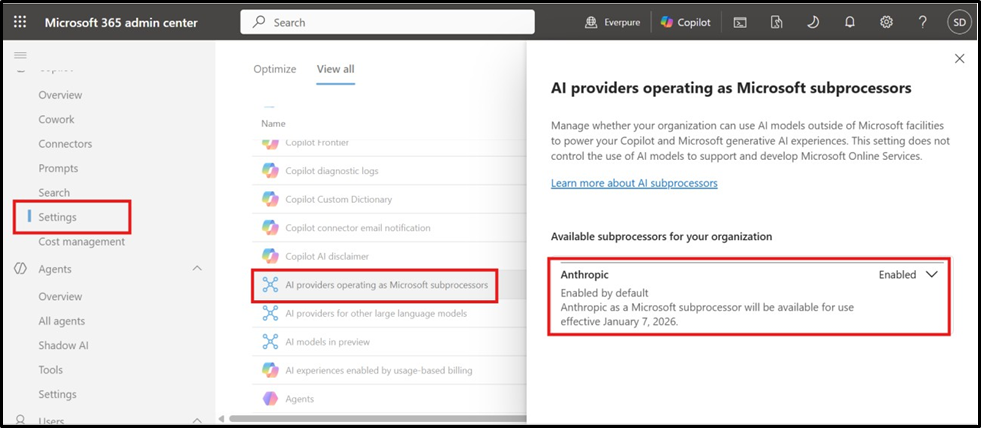
4. Enable Anthropic as a subprocess processor
Navigation: Copilot → Settings → AI Providers operating as Microsoft subprocessors
Configuration in Dynamics 365 Finance and Operations
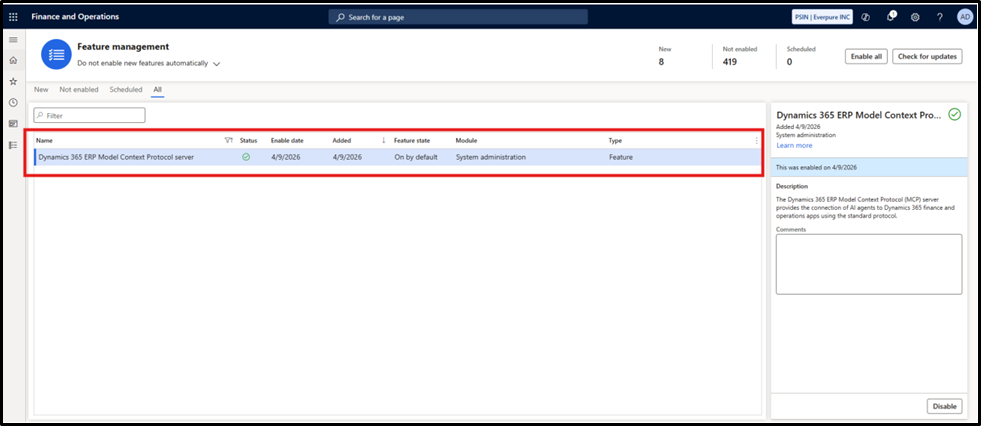
5. Enable the Dynamics 365 ERP MCP Server feature in Feature Management Navigation: System Administration → Workspaces → Feature Management
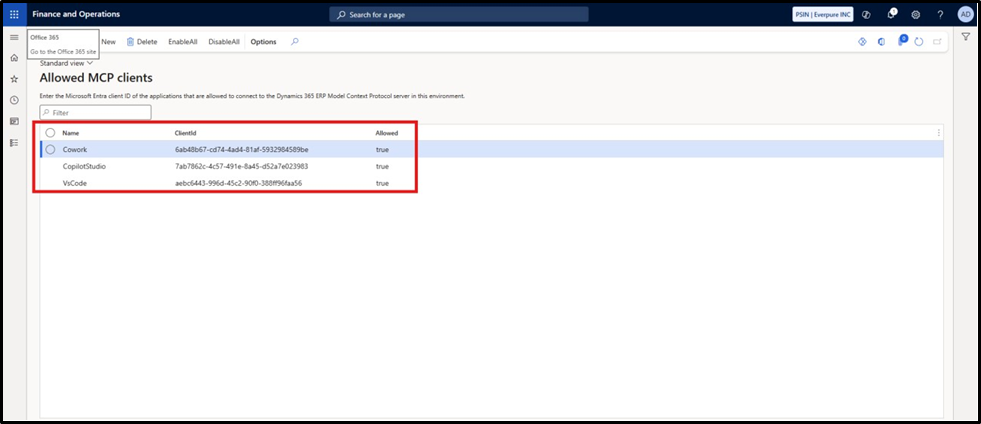
6. Enable allowed MCP clients for MCP and Cowork
Navigation: System Administration → Setup → Allowed MCP Clients
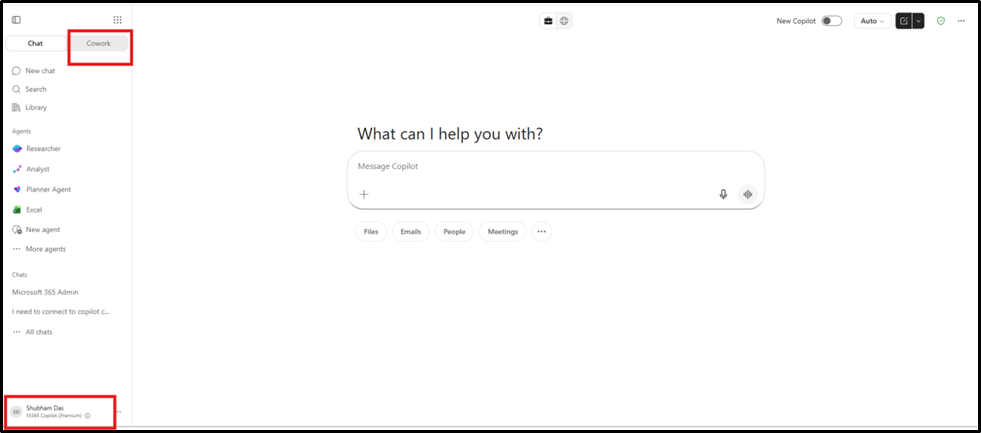
After setup is complete, open Microsoft 365 Copilot Chat and switch to the Cowork option, as shown below.
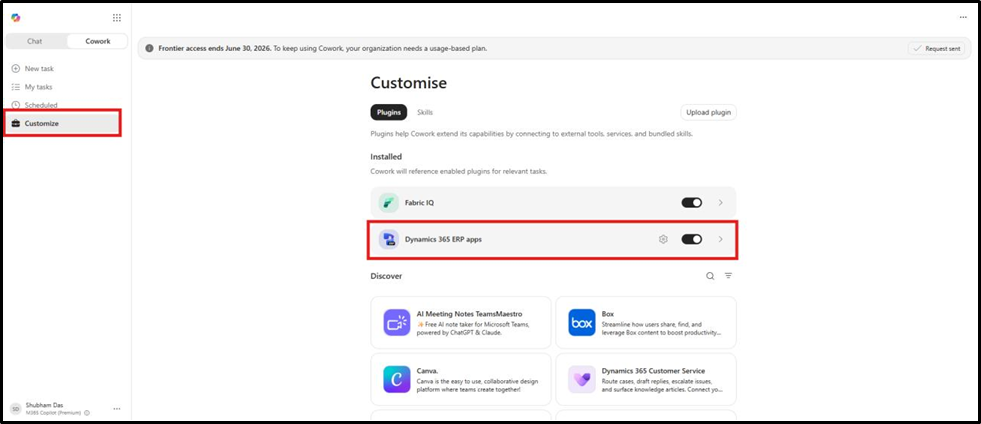
On the Cowork tab, go to Customize and enable the Dynamics 365 Finance and Operations plugin.
Select the gear icon to connect Copilot Cowork to the D365 FO environment.
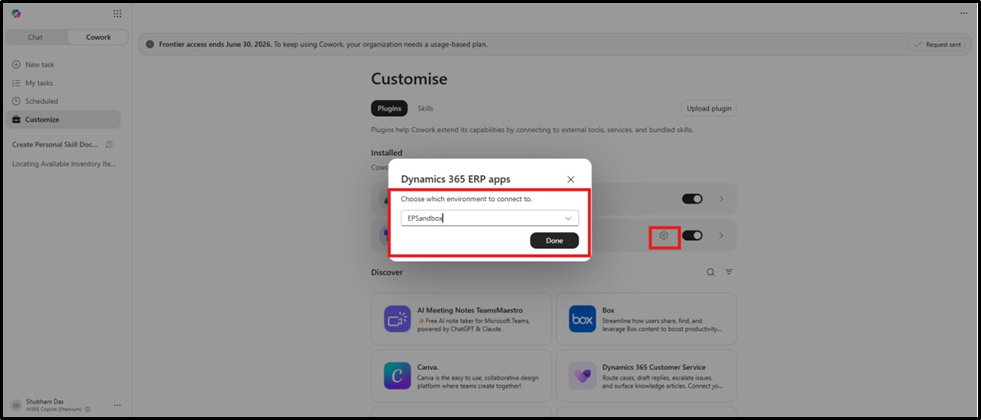
Copilot Cowork is now enabled.
Next, let us evaluate it with a sample ERP query.
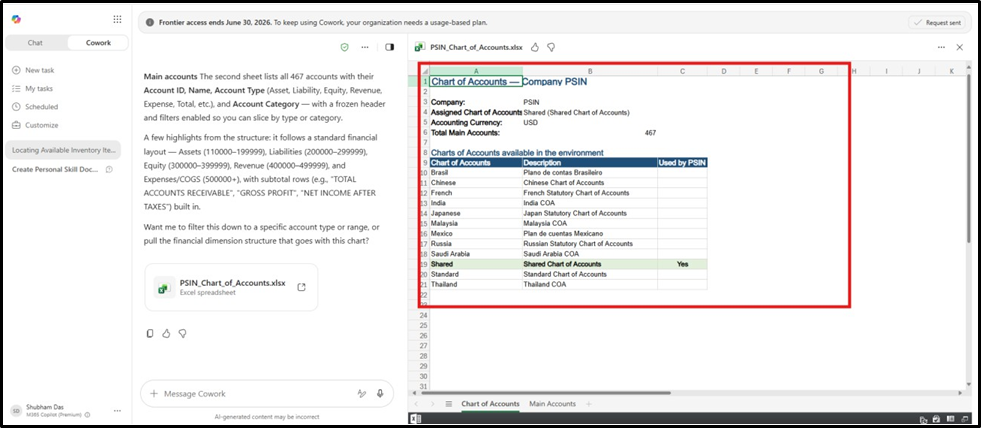
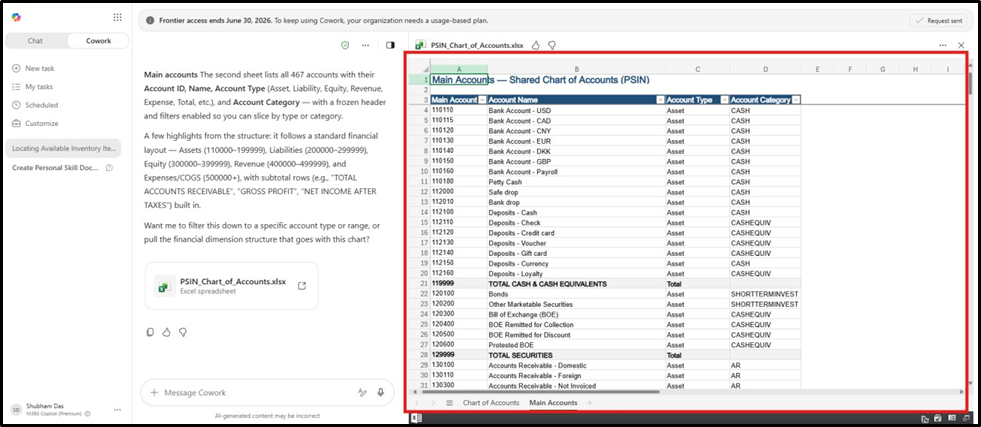
Sample query: Share the list of main accounts and the chart of accounts configured for PSIN.
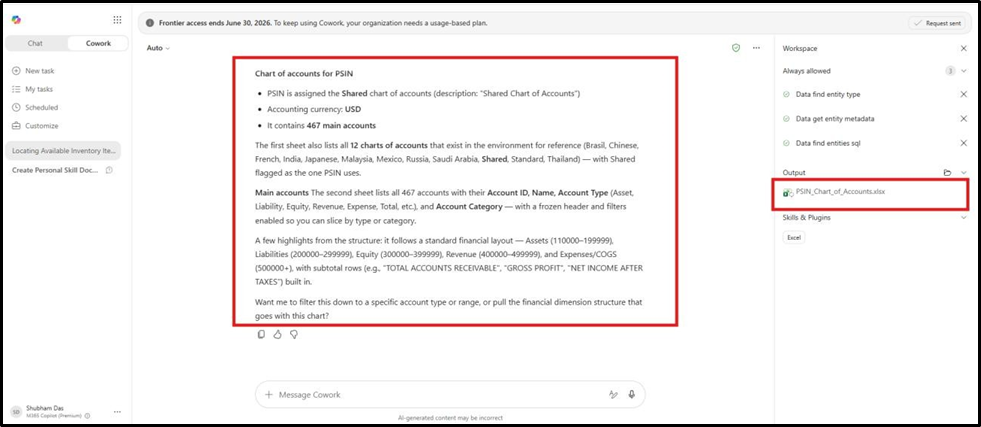
Copilot Cowork chose to share the output in Excel, considering the size of the dataset.
Use Case: Cash Flow Forecasting in D365 FO
This use case demonstrates how Copilot Cowork can combine ERP data with Outlook context to build a short-term cash flow view.
Instructions given to Copilot Cowork:
Build a 30-day cash ffow forecast using the following inputs:
-Retrieve all open AR invoices with customer names, amounts, and due dates
– Retrieve all open AP invoices with vendor names, amounts, and payment due dates
– Get current bank account balances across all legal entities
– Check for any scheduled payment journals in the next 30 days
From my Outlook emails:
– Scan emails from vendors and customers in the last 14 days
– Identify any payment commitments, delays, disputes, or advance payment requests
Combine both sources to:
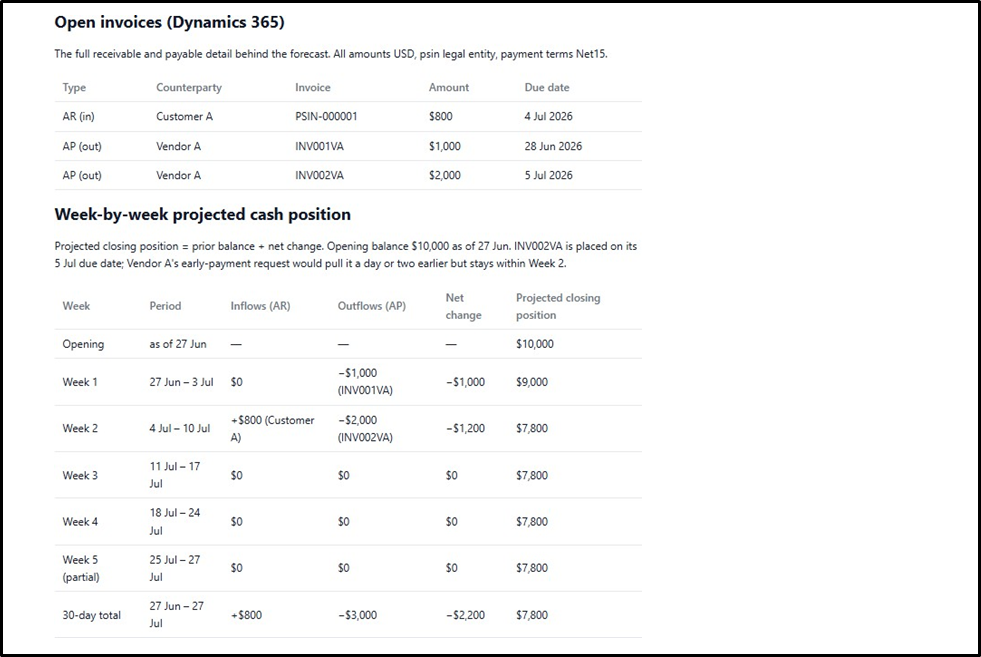
1. Show a week-by-week projected cash position for the next 30 days
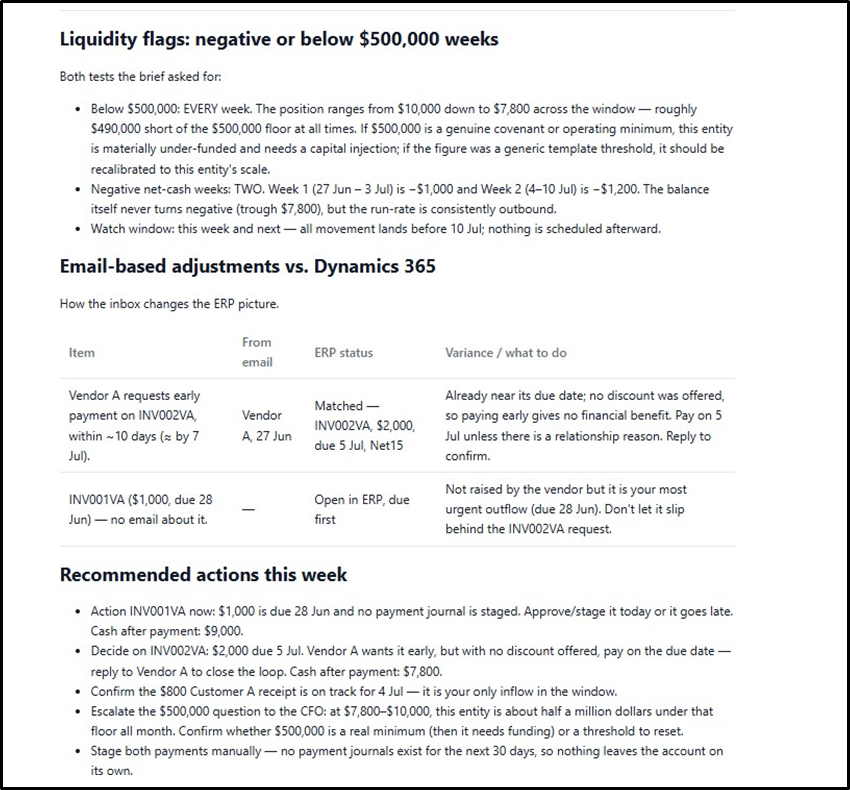
2. Highlight any weeks where net cash is negative or below :500,000
3. List email-based adjustments that differ from ERP data
4. Suggest specific actions I should take this week Present the output as an interactive document I can share with my CFO.
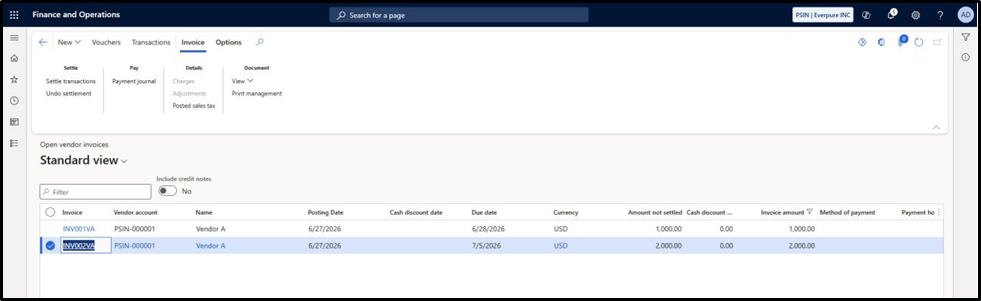
Truth in ERP Open AP Invoices
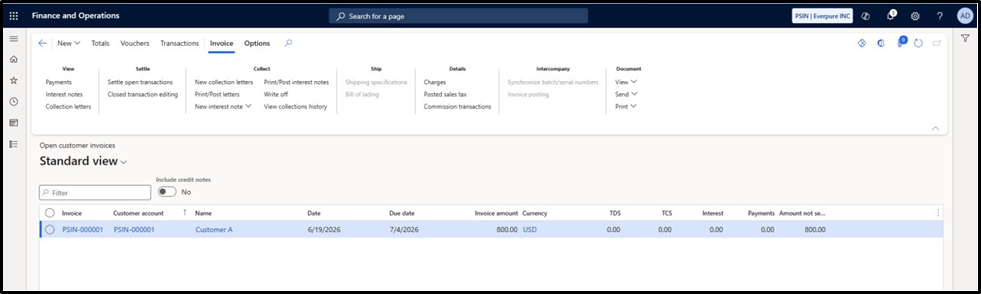
Open AR Invoices
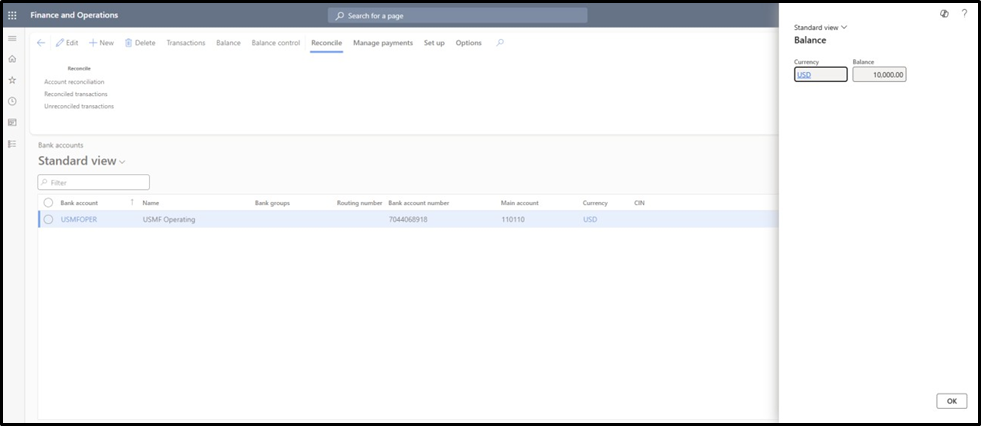
Open Cash Balances
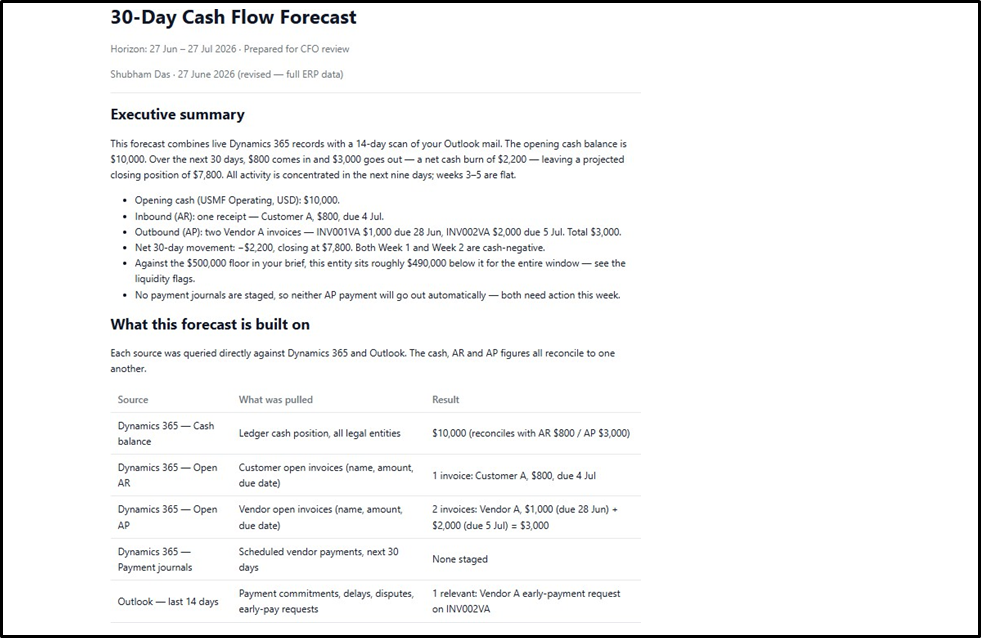
 Results from Copilot Cowork
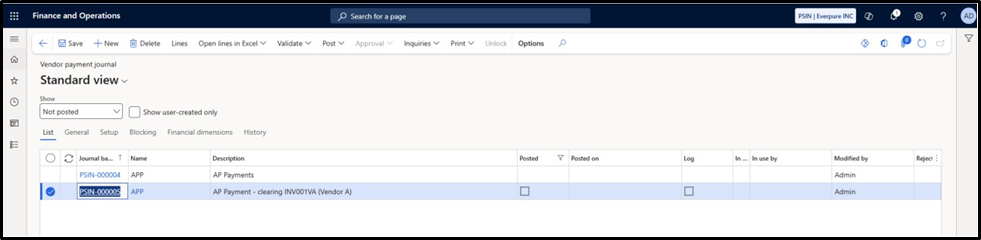
Taking the scenario further, I asked Copilot Cowork to draft a vendor payment confirmation email and create a payment journal.
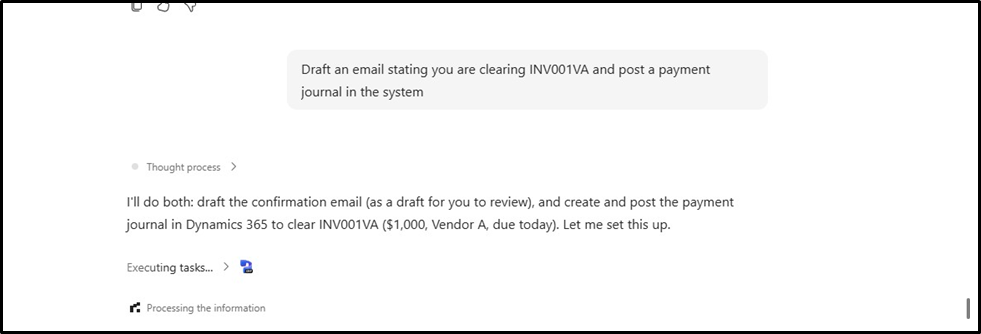
The payment journal was automatically created and is available for review before posting, as shown below.
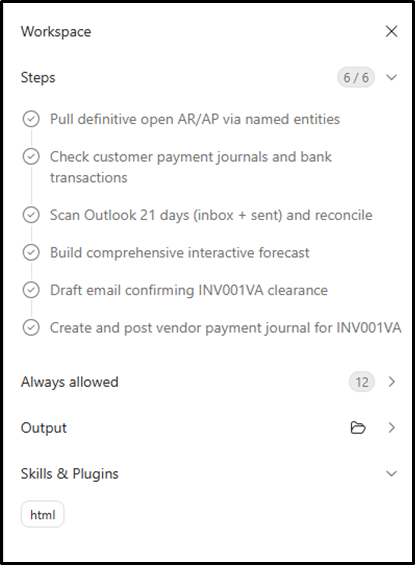
The workspace section on the coworks illustrates the step being executed and the thoughts being put into for any execution
Concluding Thoughts
We are at the beginning of a fundamental shift in how enterprise work gets done. Copilot Cowork is not simply another AI assistant — it represents the convergence of three forces
never unified before: the intelligence of large language models, the operational depth of ERP systems like Dynamics 365 Finance s Operations, and the ambient context of everyday workplace communication and WorkIQ. What once required a team of analysts, multiple reporting tools, and hours of manual consolidation now happens in a single conversation. And this is only the beginning. As the MCP ecosystem expands — already growing with partners across finance, supply chain, HR, and operations — the distance
between a business question and a business action will continue to collapse.
“The future of enterprise software is not clicking through menus. It is telling your systems what you need and trusting them to act. Copilot Cowork is that future, available today.”
What do you think? Where do you see AI agents creating the biggest impact in ERP operations — reporting, approvals, reconciliations, cash flow, or month-end close?


Leave a Reply
You must be logged in to post a comment.